
Building AI Agent Usage: What Happens When You Ask 'How Much Is This Actually Costing Me?'
About four months ago, I started using AI seriously — not just for quick searches or one-off code completions, but as a real part of how I work. Writing code, reviewing code, updating documentation, improving communications, working through technical questions. All of it.
The productivity shift was immediate and kind of staggering. Projects I would have spent weeks on were getting done in days. I started describing it to people as feeling like I had a team of ten thousand developers ready to build whatever I asked — and the framing stuck, because it felt accurate. But it wasn't just about speed. What surprised me more was how AI changed the quality of my decisions. I'd start going down an architectural path, and the AI would explain — clearly, patiently — why that path wasn't worth exploring. Months of potential rework, avoided in a single conversation.
I've been in this industry for over ten years. I studied computer science, I've built products, I've run my own company. I know what slow, careful software development looks like. AI didn't replace any of that judgment. It amplified it.
The number that wouldn't leave me alone
As my AI usage climbed, I started fixating on a small number that appears in most AI coding tools: the token count. 10,000 tokens. 50,000. 200,000 in a single session. The numbers felt abstract. I decided to make them concrete.
I looked up list pricing. I calculated what a typical day of AI usage would cost at those rates. Then I projected it out to a year.
The result: at list price, I'd be spending more than my annual salary on AI by December. If I were on a personal subscription billed at list rate, I'd probably have to sell my car.
Obviously that's not how it works. Monthly plans are a different ballgame, and enterprise pricing is different again. But the gap between "raw token count" and "what this actually costs" was genuinely hard to reason about. The numbers were so large they stopped feeling real.
So I did what I usually do with a problem that bothers me: I built something.
Version 1: make the math visible
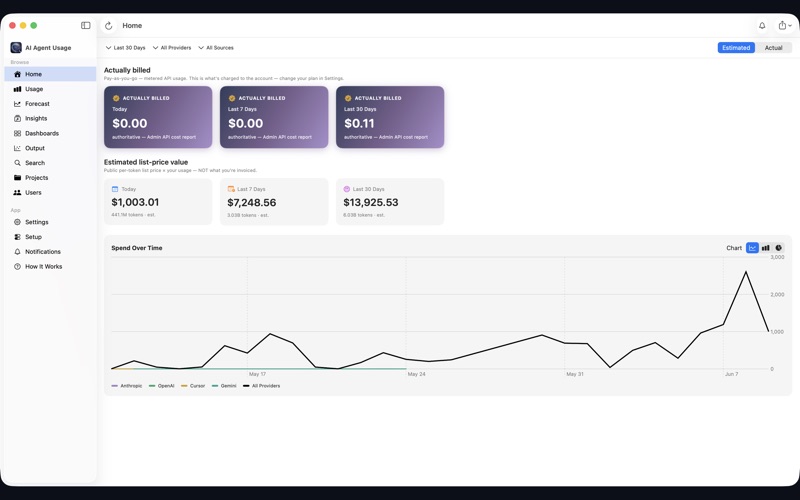
I have a background in Swift and Apple development, and I knew that AI coding tools like Claude Code write detailed session logs to hidden folders on your Mac. Token counts, timestamps, session metadata — it's all there. I wrote an app that reads those logs, prices the tokens against list rate (or whatever per-token rate you plug in), and shows you the running total.
The first version was deliberately minimal. Connect to your home folder. See your token spend. Toggle between your own estimate and authoritative numbers from a provider Admin API. That's it.
I put it on the Mac App Store for free. It cleared review, people started downloading it, and I started using it myself every day.
The more interesting question
Once I had the cost picture clear, a different question started to matter more: what am I actually spending all of this on?
I've made a habit of ending my AI sessions with a structured handoff — a session summary, a project journal entry, notes on what got done and what's still open. Over time these files accumulated. They described the texture of my days in a way that token counts never could. Not just "you spent 400,000 tokens today," but "you spent three hours building a new feature, then an hour fixing a bug, then another hour on documentation."
That felt like the real thing worth measuring. Not just cost, but productivity. Not just usage, but type of usage.
Version 1.1: categorization and insights
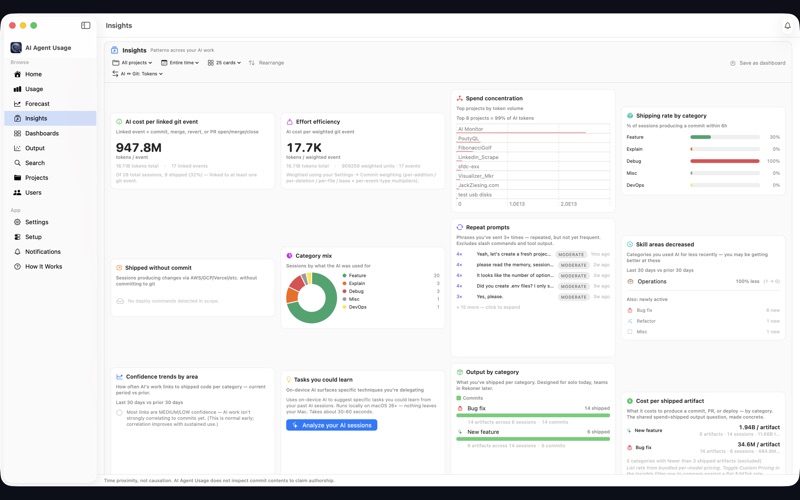
The next version added on-device session categorization using Apple's Foundation Models framework. Every session transcript gets analyzed and tagged — new features, bug fixes, refactors, documentation, learning, analysis. Then the Insights tab shows you how that mix shifts over time, by project, and by hour of the day.
This is where it got interesting. I started seeing patterns I hadn't noticed. Some days I'm almost entirely in "new feature" mode. Some days I'm debugging everything. Some days — and this is the one that made me laugh — I've called AI thirty times to analyze fourteen Gong call recordings. Is that productive? Probably, at scale. Would I have done it without AI? Almost certainly not.
That's the moment that crystallized something for me. There are things AI makes possible that I would never have attempted otherwise — not because I lacked the skill, but because I lacked the time or the scale. Analyzing a handful of Gong recordings manually? Sure. Systematically analyzing every one of them, looking for patterns across dozens of calls? That's a different category of work entirely.
On the other end of the scale: I recently migrated roughly 10,000 lines of Apex code into 500 lines of CPQ price rules in a QCP script. Months of work, compressed. That's the kind of thing that makes you realize the "team of ten thousand developers" framing was actually underselling it.

I also added a GitHub integration. The Output tab links AI sessions to the commits and pull requests that happened around them — not claiming AI wrote the code, just noting the time proximity. The result is a cost-per-shipped-artifact view. How much did that feature actually cost in AI spend? Now you can start to answer that.
Version 1.2: dashboards and forecasting
The latest version ships a full Dashboards tab. You pick exactly which insight cards to show, scope them by project and date, view in tokens or dollars, drag to reorder, and save named layouts. Insights and Output are now separate tabs. GitHub sync went to a one-click flow. There's spend forecasting — low/expected/high bands across multiple horizons so budget conversations stop being guesswork.


Where this is going
The direction I'm most interested in is moving from measurement to improvement. Right now the app tells you what you spent and what you spent it on. The next thing I want to build is something that tells you how to use AI better — which habits are producing the most output per token, where you're burning tokens without much to show for it, what your most effective sessions look like compared to your average ones.
AI adoption is genuinely hard to measure. Most people who use AI coding tools heavily have no visibility into whether they're using them well or just using them a lot. Those are different things. I want to close that gap — not just for myself, but in a way that's useful to anyone who codes with AI and has started to wonder the same questions I had.
The app is free. It runs entirely on your machine — no analytics, no telemetry, no account required. It works with Claude Code, Cursor, Codex, and Gemini. Compatible with any Apple Silicon Mac running macOS 15 or later.